Torque Pro (OBD 2 & Car)
- 4.0
- Rating
- 1.00M
- Installs
- $4.95
- Price
 Analysis by App-foxy
I approached Torque Pro as a practical communication app for the conversation between a car and its driver. Instead of relying only on dashboard warnings or a general-purpose garage visit, it gives you a way to read vehicle information through a compatible OBD connection, inspect what the engine is reporting, and decide what to do next. That makes it particularly interesting for people who enjoy understanding their car rather than treating every warning light as a complete mystery.
My first impression was that this is not really a “set it and forget it” app. It becomes useful when you have a clear question: Why is the check-engine light on? Is the engine behaving normally on a long trip? Can I record useful information before speaking with a mechanic? The answers depend on the vehicle, the adapter, and the quality of the data being reported, so the app rewards a careful workflow more than casual tapping.
From a warning light to a useful diagnosis
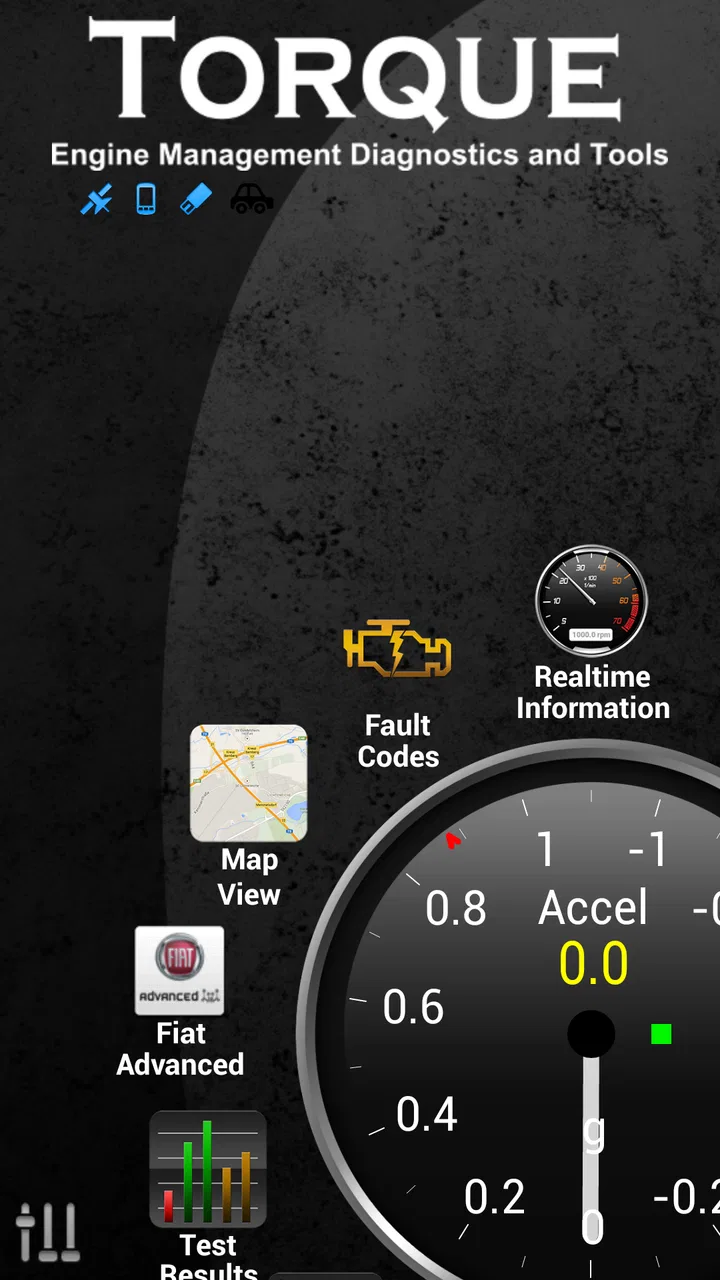
The starting condition is usually simple. A warning appears, the car feels different, or I want to watch engine behavior while driving. Torque Pro is designed to sit between that concern and the next decision. It can measure horsepower and torque, show a zero-to-sixty style acceleration run, clear OBD faults, and display engine information in Google Earth. Those tools sound broad, but they make more sense when treated as separate stages rather than one giant dashboard.
You May Also Like

 Blood Strike: 2.5 Anniversary
Blood Strike’s Loadouts Turn Every Drop Into a Tactical Gamble
A close look at Blood Strike’s custom loadouts: how fast access to signature weapons reshapes its battle royale rhythm, rewards preparation, and narrows the gap between fights.

 Pandora - Music & Podcasts
Pandora’s Music Is Easy to Start, but Harder to Recover
Pandora’s strength is its low-effort path from a seed to a station. Its weak spot is how much confidence it asks you to place in connection, setup, and quiet recovery.

 8 Ball Pool
 Is Built on Rivalries, Rematches, and Routine
A close look at the rivalries, rematches, shared routines, and unanswered safety questions that turn a quick pool match into a persistent mobile community.

 Samsung Music
’s Quiet Strength Is Playing What You Already Own
Its reach comes less from spectacle than from dependable access to a personal library. That simplicity is both the app’s strongest retention engine and its ceiling.

 AccuWeather: Weather Radar
AccuWeather Review: A Quick, Clear Forecast for Everyday Decisions
For everyday plans, the best forecast is the one you can understand quickly. AccuWeather makes rain timing, radar, and local conditions easy to act on, with a few trade-offs.

 Hill Climb Racing
Why Hill Climb Racing Still Turns Crashes Into One More Run
A tiny car, a bumpy hill and one more upgrade: Hill Climb Racing keeps resurfacing because its simple chaos makes every near-miss feel personal.
More From Our News Desk



The app comes from Ian Hawkins and belongs to the communication category, although its subject is very specifically the communication between an Android device and a vehicle. It has been available since March 7, 2010, and its current version is 1.12.108. The minimum operating system is Android 4.1, which makes it accessible to many older devices, though compatibility with the car still matters just as much as phone compatibility.
There is a useful distinction here between reading information and repairing a problem. Torque Pro can help expose fault codes and clear them, but clearing a warning is not the same as solving the cause. I would use the reset function only after recording the code and understanding why it appeared. If the underlying issue remains, the light may return, and erasing the evidence too early can make a mechanic’s job harder.
Preparing the connection before driving
The first handoff is from the car’s diagnostic port to the OBD adapter, then from that adapter to the phone. This is where many disappointing first experiences begin. The app cannot compensate for an unreliable adapter, an unsupported vehicle protocol, or a connection that drops whenever the phone changes its wireless state. I would install the app, pair the adapter while parked, and wait for live engine information before attempting a road test.
That preparation is more important than it sounds. A dashboard full of empty gauges can look like an app failure when the real problem is the adapter or pairing process. I prefer starting with a small number of readings, confirming that they update sensibly, and only then building a more detailed screen. The practical tip is to test the entire chain at home or in a parked car, not for the first time beside a busy road.
Because this is a paid app priced at $4.95, I expect more than a decorative collection of gauges. In use, the value depends on whether I actually have an OBD setup and a reason to inspect the data. If I do, the one-time purchase can be easier to justify than repeatedly paying for a basic scan at a shop. If I only want a speedometer or a simple trip display, this is more equipment and learning than I need.
Choosing information instead of filling the screen
Once the connection is working, the next step is deciding what deserves attention. Torque Pro can present engine data, but displaying everything at once is not automatically helpful. I would create a focused view for ordinary driving and a separate one for troubleshooting. The first might emphasize information that helps me notice unusual behavior; the second can be arranged around the specific fault or symptom I am investigating.
This is one of the app’s less obvious strengths: it can turn a vague concern into a repeatable observation. For example, if the car hesitates only after warming up, I can compare the readings during a cold start, normal cruising, and the moment the hesitation occurs. That does not replace professional diagnosis, but it gives me a better record than “the car felt strange sometime this week.”
I would also avoid treating calculated horsepower and torque as laboratory measurements. They can be interesting for comparing the same car under similar conditions, but they are affected by assumptions, vehicle inputs, road conditions, and the quality of the connection. The best use is trend watching: did the result change after maintenance, a load change, or a different route? The worst use is treating one impressive-looking number as proof of engine output.
Turning a drive into evidence
A realistic everyday scenario is a long trip in a car that has recently shown an intermittent warning. Before leaving, I would connect the adapter while parked, confirm that the app is receiving information, and note the existing fault code rather than immediately clearing it. During the drive, a passenger could watch the readings or review them later. If the warning returns, the timing and driving conditions become useful context for the next conversation with a technician.
The zero-to-sixty function has a different role. It can make the app engaging for enthusiasts who want to compare acceleration runs, but I would use it only in a controlled, legal, and safe setting. It is not a reason to test performance in traffic. The more valuable lesson is that the app can collect a repeatable driving observation, whether the goal is performance curiosity or noticing that the car is no longer behaving as it did before.
For location-based review, the Google Earth connection adds another handoff. Engine information and route context can be considered together, which may help when a symptom appears only on a particular climb, road, or journey. I would treat that as supporting context rather than a complete diagnostic map. A route can show where something happened, but it does not explain why the engine behaved that way.
What to do with fault codes
Fault handling is where restraint matters most. A code is a clue, not a final verdict. I would write down the code, the conditions under which it appeared, and any changes in how the car felt before choosing the clear option. This simple order prevents a common mistake: removing the warning and then losing the most useful starting point for diagnosis.
Clearing faults can still be convenient after a repair or after confirming that a temporary issue has been addressed. It can also help check whether a warning returns. But I would not use it to make a dashboard look normal before selling a car, passing responsibility to someone else, or continuing to drive through a serious symptom. A quiet dashboard is not proof that the vehicle is healthy.
For a professional mechanic, the app may be a useful extra source of information, but it is unlikely to replace workshop equipment or hands-on inspection. For a careful owner, it can make the first conversation much more precise. I would arrive with the code and circumstances, not just a screenshot of a gauge. That is the handoff where the app provides its best practical value.
Where the workflow becomes inconvenient
The biggest friction is the number of links in the chain. The phone must run a compatible Android version, the adapter must connect reliably, the vehicle must expose usable information, and the readings must be interpreted sensibly. A failure at any one stage can produce confusing results. This is not the smooth experience of opening a weather app; it is closer to using a small diagnostic instrument assembled from several parts.
Another limitation is that vehicle data is not equally rich across every car. Some readings may be unavailable, labeled differently, or less useful than expected. I would not buy the app assuming that every advertised measurement will appear on every vehicle. The sensible approach is to confirm that the car and adapter are suitable, then judge the app by the information that actually arrives.
The interface can also feel more technical than welcoming. That is not necessarily a flaw for an enthusiast, but it raises the learning curve for someone who has never seen an OBD parameter before. I found that a smaller, purposeful layout is easier to trust than a wall of constantly changing values. Too many live numbers encourage guessing, especially when a reading changes normally but looks alarming to an inexperienced user.
There is also the question of attention while driving. Any live diagnostic screen can become a distraction if I keep checking it. I would configure the view before moving, let a passenger monitor it, or review information after stopping. The app is most useful when it supports a driving plan, not when it competes with the road.
Who gets the most from it
I would recommend Torque Pro to an Android-owning car enthusiast, a driver who wants to understand recurring warnings, or someone who regularly maintains an older vehicle and values having basic diagnostic information available. It is also a good fit for people who enjoy comparing the same car over time, provided they understand that repeatable conditions matter more than a single headline number.
It is less suitable for someone who expects a plug-in device to identify every mechanical problem automatically. It is also not my first choice for a driver who wants a polished, minimal interface with no setup. A manufacturer’s service system or a professional scan tool is better when the issue is safety-critical, the fault is complex, or the repair requires tests beyond the information exposed through the vehicle connection.
The app’s Everyone content rating makes it broadly approachable, but that should not be confused with “risk-free for every use.” The responsibility comes from how the readings are interpreted and when the phone is used. I would keep the actual troubleshooting parked, avoid performance testing on public roads, and treat serious warnings as reasons for qualified help rather than invitations to experiment.
How it compares with simpler alternatives
Compared with a basic code reader, Torque Pro offers a more continuous view of the car instead of a single scan-and-forget interaction. That is valuable when a symptom is intermittent or when I want to observe behavior during a trip. A basic reader may be easier for someone who only wants to retrieve a code once, while this app makes more sense when the phone is part of an ongoing monitoring routine.
Compared with a professional diagnostic platform, it is more affordable and portable, but it does not turn a phone into a complete workshop. Professional tools generally fit structured repair procedures better, especially when a technician needs deeper system access or guided testing. I see Torque Pro as a bridge between “the car has a warning” and “I have enough context to decide what to do,” not as a universal replacement for a garage.
Compared with a generic driving dashboard, its advantage is the direct focus on engine and OBD information. A regular dashboard app may be simpler for navigation or everyday trip awareness, but it will not necessarily help me investigate a fault or compare engine behavior. The trade-off is that Torque Pro asks me to understand the vehicle connection and choose relevant readings instead of delivering a finished, effortless display.
Why its established user base matters, and what it does not prove
The app has more than one million installs, an average rating of 4.0 from around eighty-one thousand ratings, and roughly eleven thousand written reviews. Those figures suggest that it has found a durable audience, especially among people comfortable with vehicle diagnostics. They do not guarantee that it will work perfectly with my particular car, so I would still treat compatibility and adapter quality as the deciding factors.
Its long availability is reassuring in a practical way: this is not an experimental idea built around a fashionable dashboard. At the same time, an established app can still feel less modern than newer tools designed around a narrower purpose. I would choose it for breadth and control, not because I expect every screen to be as effortless as a newly designed consumer app.
My final workflow and verdict
My preferred workflow is straightforward. I begin with a symptom or a question, connect the adapter while parked, verify that live information is updating, and choose only the readings relevant to that question. I record a fault before clearing anything, observe the conditions around a repeatable drive, and pass the resulting details to a mechanic when the issue needs professional attention. That sequence keeps the app useful without pretending it can do the whole job.
The strongest outcome is not a dramatic gauge or a cleared warning. It is a clearer decision: continue monitoring, arrange maintenance, stop driving, or bring better evidence to a repair shop. The app can also make ordinary ownership more interesting by showing how the engine responds to different conditions, but curiosity should remain secondary to safe driving and sound interpretation.
After using it as a diagnostic companion rather than a magic repair button, I see good value for the right owner. The $4.95 price is reasonable when I already have a compatible adapter and intend to use the information more than once. Someone seeking a one-tap answer, automatic repair advice, or a completely polished dashboard should choose a simpler or more specialized alternative.
My recommendation is conditional but positive: choose Torque Pro if you want hands-on access to OBD information and are willing to learn what the readings mean. Start with a controlled connection test, keep the screen focused, preserve fault information before resetting it, and use professional help whenever the vehicle’s behavior or warning suggests a serious problem. Used that way, it turns a phone into a genuinely useful part of the car-maintenance workflow rather than just another screen on the dashboard.
FAQs for Torque Pro (OBD 2 & Car)
01What is Torque Pro (OBD 2 & Car), and what does it do?
Torque Pro is an Android vehicle diagnostic and monitoring app that connects to a compatible Bluetooth or Wi-Fi OBD2 adapter. After pairing it with the car, the app can display live information such as engine speed, coolant temperature, fuel data, speed, and sensor readings. It can also read and clear many diagnostic trouble codes, although the exact information available depends on the vehicle and adapter.
02Is Torque Pro compatible with every car and OBD2 adapter?
No. Compatibility depends on the vehicle, its diagnostic system, and the adapter being used. Most cars sold in regions where OBD2 or EOBD is required are likely to work for basic functions, but older vehicles may not support the standard fully. A reliable ELM327-compatible adapter is recommended, since inexpensive or counterfeit adapters can cause connection problems, missing data, or inaccurate readings.
03Can Torque Pro diagnose and fix check-engine-light problems?
Torque Pro can read diagnostic trouble codes supported by the vehicle and may allow users to clear them after recording the information. However, clearing a code does not repair the underlying fault, and the warning light may return. The app is best considered a diagnostic aid rather than a replacement for professional equipment. Serious, recurring, or safety-related problems should be inspected by a qualified mechanic.
04Does Torque Pro require an internet connection or subscription?
The core functions of Torque Pro generally work through the phone’s connection to the OBD2 adapter and do not require continuous internet access. You can view live data, record trips, and perform many diagnostic tasks offline once the app and adapter are set up. Some optional features, map-related functions, updates, or third-party services may require internet access, while availability of payment terms can depend on the store listing.
05Is Torque Pro easy to use for beginners?
The app offers many dashboards, gauges, logs, and customization options, but its large number of settings can feel overwhelming at first. Beginners should start by pairing the adapter, selecting the correct connection type, and using a simple dashboard before exploring advanced sensors and custom displays. Readings also require interpretation, so users should avoid making mechanical decisions based only on one value or an unfamiliar trouble code.
Pros
- Reads live engine data through a compatible OBD2 adapter.
- Offers customizable dashboards with gauges and sensor readings.
- Can record trips and export diagnostic data for later analysis.
- Supports fault-code reading and clearing on many vehicles.
- Includes GPS-based trip tracking and performance measurements.
Cons
- Requires a separate OBD2 Bluetooth or Wi-Fi adapter to function.
- Vehicle compatibility varies
- especially for manufacturer-specific sensors.
- Some advanced readings may require extra plugins or configuration.
- Incorrectly clearing codes can hide issues without fixing the cause.
- The interface feels dated compared with newer car diagnostic apps.

Torque Pro (OBD 2 & Car)
Gallery